
- Are we leaking PII to any of our vendors?
- Which vendors, events, and fields are involved?
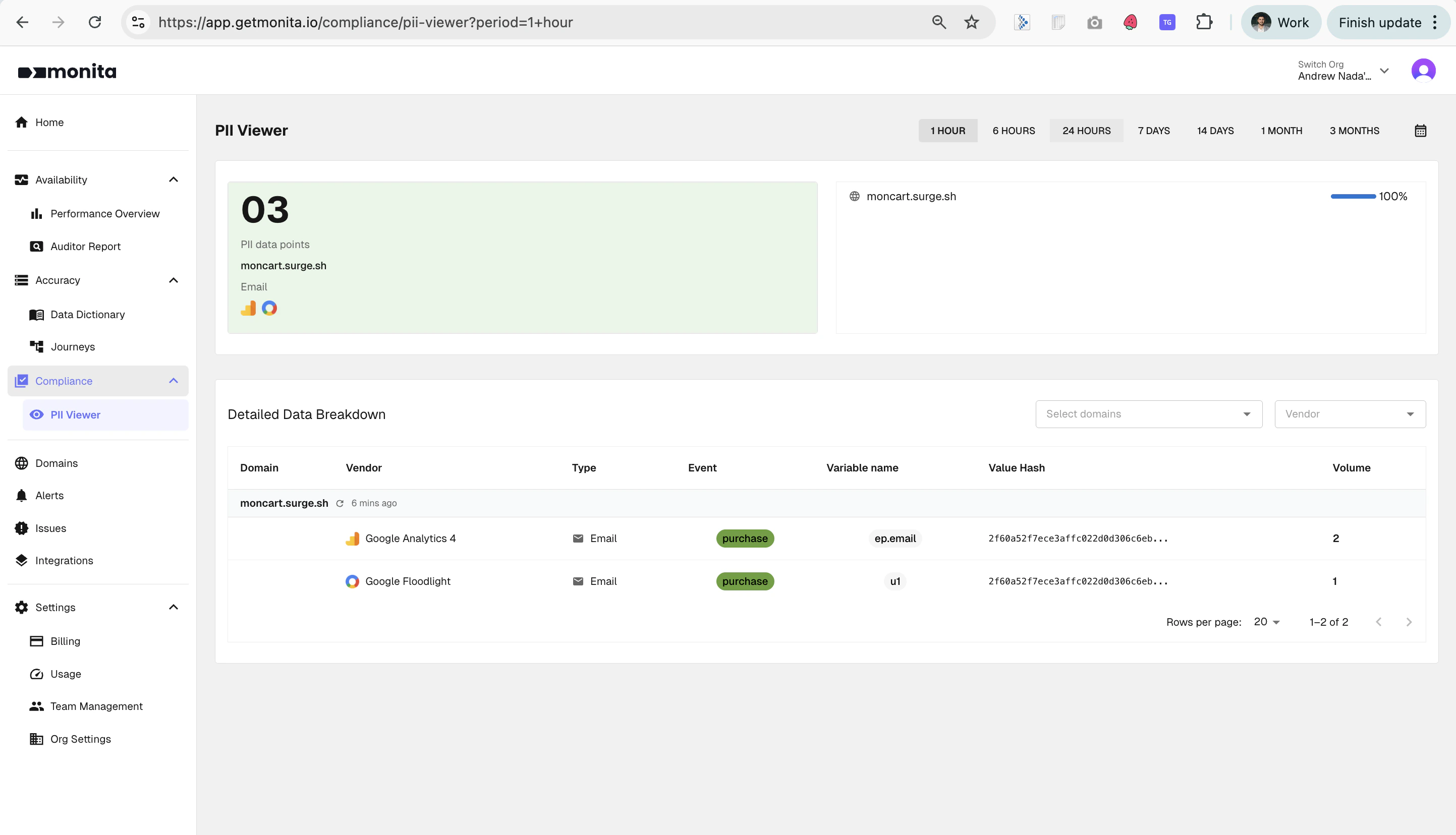
The PII Viewer surfaces detected PII data points by domain, vendor, event and field
How Monita handles detected PII
Monita is built privacy‑first. We never store the raw PII values that we observe in your traffic. When PII is detected in a request leaving your site:- The original value is immediately replaced with a SHA‑256 hash before the record is written to our database.
- A
pii_typelabel (e.g.email) is attached to the record so it can be surfaced in the PII Viewer. - The hashed record is retained so you can still see the vendor, event, field name, and volume of leaks without ever exposing the underlying PII.
Because values are one‑way hashed in flight, even Monita support cannot retrieve the raw PII that was detected. The hash is, however, stable — meaning the same email address will always produce the same hash, which is enough to let you de‑duplicate or count unique users.
What you see in the PII Viewer
The viewer is split into two sections.Summary card
A high‑level count of distinct PII data points detected in the selected time window, broken down by domain, PII type, and the vendors involved.Detailed Data Breakdown
A row‑level table showing every detected leak, including:
You can filter by domain and vendor, and adjust the time window (1 hour through to 3 months) using the controls at the top of the page.
What types of PII does Monita detect?
Monita continuously scans every request streamed through Global Monitoring and looks for the following PII types:Out of scope (today)
To keep detection accuracy high, the following are not currently detected automatically:- Names, postal addresses, dates of birth
- Passport / driver’s licence numbers
- Phone numbers from countries other than the US and Australia
- PII buried inside long blocks of unstructured free text
Setting up custom PII alerts
While Monita surfaces all detected PII inside the PII Viewer, alerts are opt‑in. This is intentional — different organisations have very different policies about which vendors are allowed to receive which fields, so you remain in control of when and how you’re notified. To get a Slack or email notification any time PII is detected against a particular vendor, create a Data Validation alert with aContains email (or equivalent) operator on the relevant parameter.
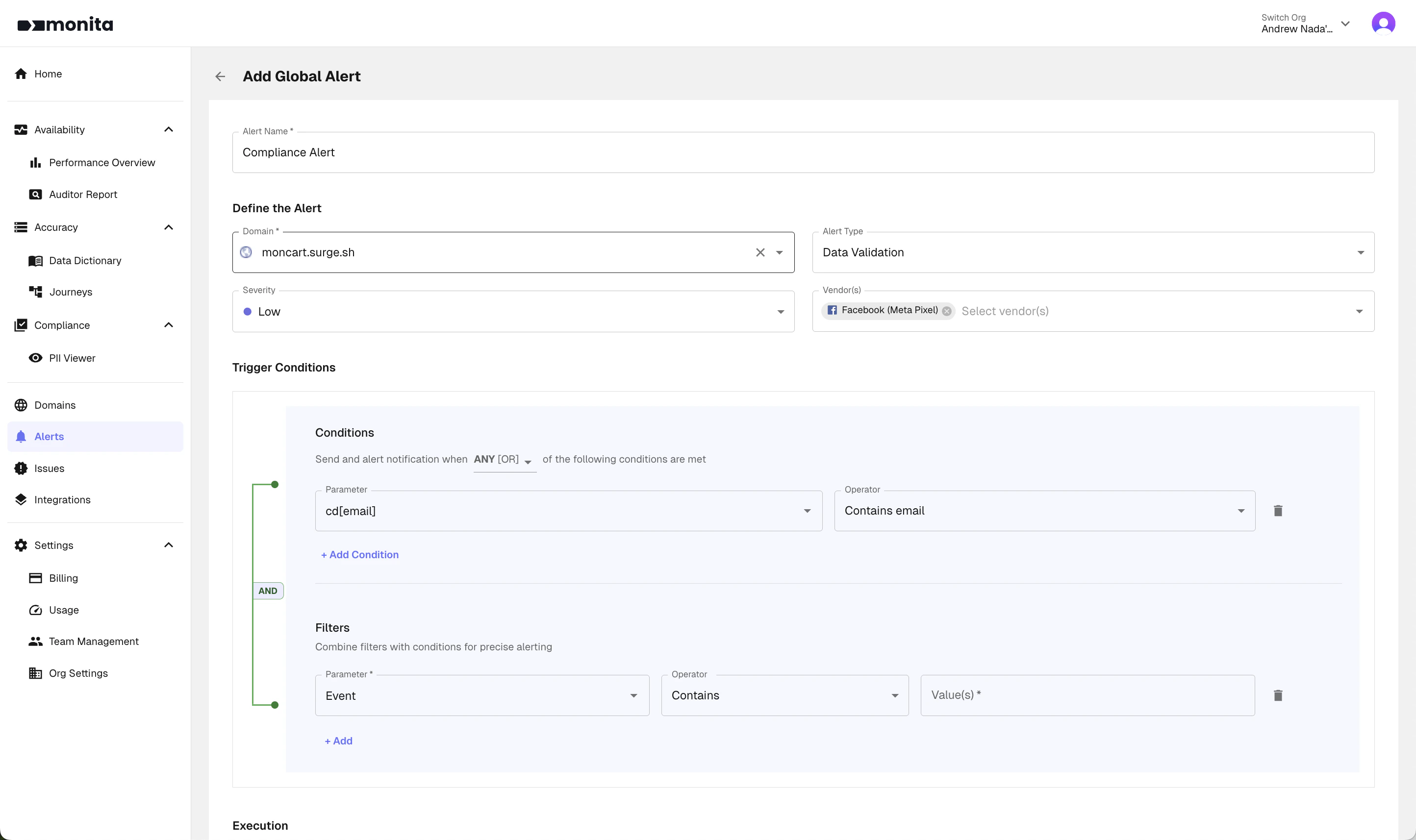
Example: a Compliance Alert that fires whenever an email is detected being sent to Meta Pixel
- Hover on your domain card and click Alerts, then New Alert.
- Set Alert Type to Data Validation and pick the Vendor(s) you want to monitor (e.g. Meta Pixel, Google Ads).
- Under Trigger Conditions, set the Parameter you want to inspect and choose an operator like
Contains email,Contains credit card, etc. - Optionally add Filters (e.g. only on the
purchaseevent) to scope the alert. - Choose your Execution period and destination (Slack or email) and save.
Data Validation alerts can run in realtime for Global Monitoring customers — meaning you’ll be notified within seconds of a PII leak, rather than waiting for a scheduled evaluation window.
FAQ
Will Monita ever store the raw PII it detects?
Will Monita ever store the raw PII it detects?
No. Detected PII values are SHA‑256 hashed in flight, before any data is written to our database. The raw value cannot be recovered, by you, by us, or by anyone else.
Why hash instead of dropping the value entirely?
Why hash instead of dropping the value entirely?
Hashing preserves the ability to count unique users, de‑duplicate, and trend leakage volumes over time in the PII Viewer, all without ever exposing the underlying value.
Why didn't Monita detect a particular PII value I can see in the raw payload?
Why didn't Monita detect a particular PII value I can see in the raw payload?
Monita’s detection is conservative by design — we’d rather miss an edge case than flood the platform with false positives. Common reasons a value isn’t flagged include: the value is a PII type we don’t yet cover (e.g. a name or address), the field name doesn’t include a recognised keyword for ambiguous types like phones/SSNs, or the value is embedded inside a larger free‑text blob. If you have a specific case you’d like reviewed, contact support.
Can I be alerted automatically when PII is detected?
Can I be alerted automatically when PII is detected?
Yes — set up a Data Validation alert using a
Contains email (or similar) operator. This is opt‑in so you control exactly which vendors and parameters trigger a notification.